install app on google play.

Apps

Download Android Apps Free.

Games

Download Android Games Free.

Showing posts with label System_Tools. Show all posts

Aug 1, 2016

ES File Explorer/Manager PRO v1.0.7 APK (ඇන්ඩ්‍රොයිඩි සඳහා ඇති අංක #1 පයිල්මැනේජරය.)

ES File Explorer/Manager PRO com.estrongs.android.pop.pro
ඇන්ඩ්‍රොයිඩි දුරකථනයක් භාවිතා කරන ඔබට File Manager ගැන අමුතුවෙන් කියලා දෙන්න දෙයක් නෑ, මොකද දුරකථනය භාවිතා කිරිමේදි නිතර අවශ්‍ය වන, දුරකථනයට නැතුවම බැරි ඇප් ඵකක් තමයි  File Manager කියලා කියන්නේ. ඔබ දුරකථනයක් මීලදිගන්න අවස්ථාවේ තියෙන ඇන්ඩ්‍රොයිඩි මෙහෙයුමි පද්ධතිය සමග අනිවාර්යෙන්ම File Manager යක් ඇතුලත් වෙලා තියෙනවා. හැබැයි ඉතින් ඵ් ඵ් දුරකථන සමාගමට අනුව මේ File Managerය වෙනස් වෙනවා. ඔබේ දුරකථනට ඵන File Manager යෙන් ඵහෙමත් නැතිනමි ඔබ දැනට භාවිතා කරන File Managerයෙන් ඔබ සෑහීමකට පත්වෙනවද..?

ඵමෙනමි මෙන්න දැනට ලොකයේ ඇන්ඩ්‍රොයිඩි භාවිතා කරන්නන් මීලියන 100කට අධික පිරිසක් භාවිතා කරන ඇන්ඩ්‍රොයිඩි සඳහා ඇති අංක #1 ES File Explorer/Manager PRO පයිල් මැනේජරයේ PRO සංස්කරණය.

PRO සංස්කරණයේ ඇති පහසුකමි :
√ Remove Ad an Ad free version 
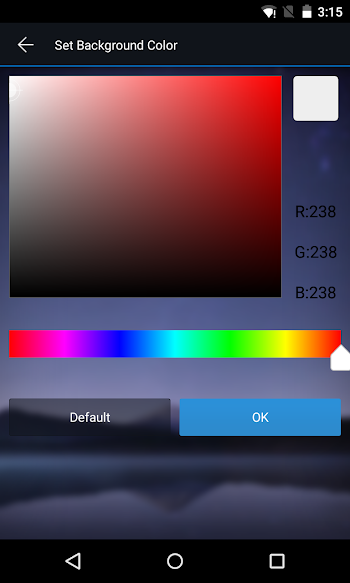
√More to customize updated color panel and more start page options
√More to expect ES File Explorer (File Manager) team will keep improving the app and strive to keep it the #1 most powerful file manager for android. 
√more theme options Following Google material design and more theme options coming soon
With ES, you can access your FTP server, Wi-Fi file transfer, Bluetooth file transfer and connect your chromecast device easily.

ES File Explorer 
PRO File Manager යේ කැපි පෙනෙන පහසුකමි  :
★ File Manager: Easily list any kind of file, libraries for all Music, Picture, and Video files. Connect file on PC, Mac, Linux Server, Phone, Tablet, Clouds 
★ File Transfer: Transfer file from PC to Mobile, Mobile to Mobile, Mobile to PC
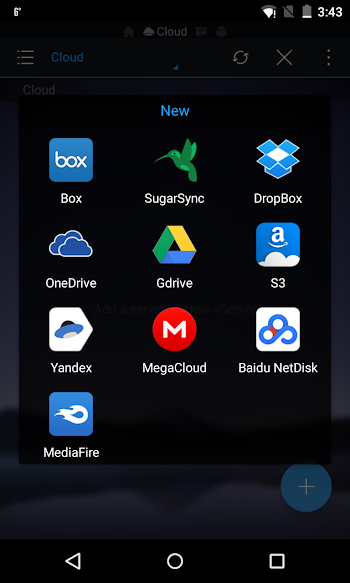
★ Cloud Management: ES supports Dropbox, Box.net, Sugarsync, Google Drive, OneDrive-SkyDrive, Amazon S3, Yandex and many other clouds platforms.
★ SD card analyst: with ES you can analyze your SD card usage and manage files as needed according to the results

පහසුකමි :
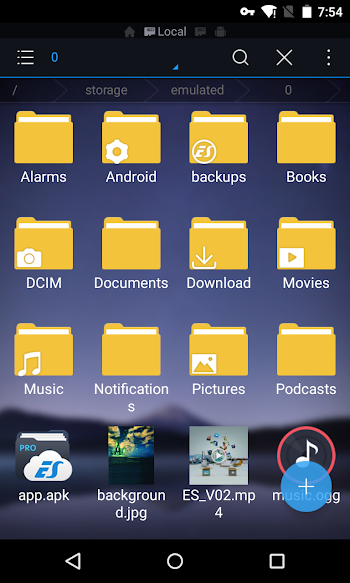
►File Manager: Access to your Phone SD card, External SD card and Phone Internal Storage, Manage your files just like you do on your desktop or laptop using Multiple Select, Cut/Copy/Paste, Move, Create, Delete, Rename, Search, Share, Send, Hide, Create Shortcut, and Bookmark 
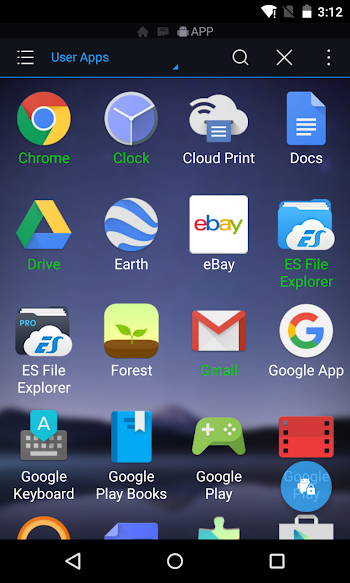
►App Manager: Categorize, uninstall, back up, create shortcuts to your apps and delete APK files
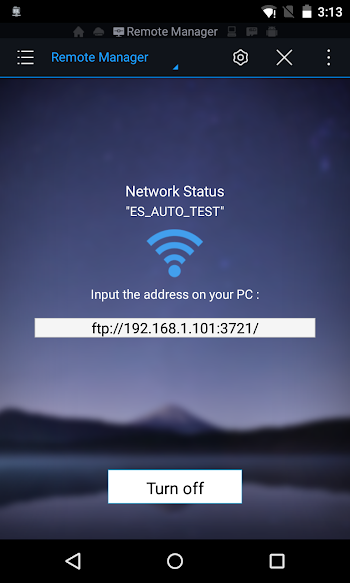
►Remote File Manager: When this feature is enabled, you can manage files on your phone from your PC, tablet, Mac, Linux Server
►Archive manager: Allows you to compress and decompress ZIP files, unpack RAR files, 7z files, and create encrypted (AES 256 bit) ZIP files
►Built-in viewers and players for various file types: Including photos, music, and videos; supports third-party applications such as Quick Office for efficient and better productivity
►Shows thumbnails: For APKs and images
►Text viewers and editors
►Access your home PC: Through your smartphone via WiFi with SMB
►Functions as an FTP and WebDAV client: Manage files on FTP, FTPS, SFTP, and WebDAV servers just like you manage files on your SD card
►Bluetooth file browser: You can copy and paste files between Bluetooth-ready devices. ES File Explorer (File Manager) supports OBEX FTP for browsing devices and transferring files between Bluetooth devices
►Kill tasks with a single click, increase memory and speed up your device: Includes a simple widget that stays on your home screen to let you know your current RAM status and automatically kill tasks, with an ignore list for the applications you want to keep running. The Task Manager module is required for this feature.
►Cache Cleaner and Auto-start Manager: Delete junk files that take up valuable storage space. The Task Manager module is required for this feature.
►Root Explorer: The ultimate set of file management tools for root users. Provides access to the entire file system and all data directories, and allows the user to change permissions.
►Supports Multiple Languages: English, Russian, Japanese, Korean, French, Spanish, German, Italian, Czech, Hungarian, Ukrainian, Tamil, Catalan, Turkish, Lithuanian, Portuguese and many more...

නව සංස්කරණයේ වු වෙනස්කමි : (Updated : 14 June 2016)
    V1.0.7
    *Fixed unsafe implementation
    V1.0.5
    *FTP can't change root directory bug fixed
    V1.0.4
    *Add CANCEL SYNC TO CLOUD feature
    *Disable auto-sync if source path does not exist
    *Bugs fixed
    V1.0.3
    *Added auto Sync to Cloud feature(set by long pressing a folder—More, via Wi-Fi only)
    *Added Mail Encrypt Password To Me feature
    *Added new Themes
    *Fixed crash issues
    V1.0.2
    *Added Mega Cloud service
    *Gesture is back
    සහය දක්වනු ලබන ඇන්ඩ්‍රොයිඩි සංස්කරණ : 2.2 සිට ඉහලට


    ES File Explorer/Manager PRO v1.0.7 APK
    බාගතකිරිමට උපදෙස්
    1.  ඉහත ඇති (බාගතකරගන්න) යන්න මත ක්ලික් කරන්න.
    2.  ඉන් පසුව වෙළඳ දැන්වීමක් දර්ශණය වන අතර තත්පර 5ක් රැදි සිටින්න.
    3.  ඉන්පසු පිටුවේ දකුණු පස ඉහල ඇති Skip ad යන කහපැහැති බොත්තම මත ක්ලික් කරන්න


    Screenshots :


Jul 27, 2016

Titanium Backup PRO ★ root v7.5.0 APK (ඇන්ඩ්‍රොයිඩි සදහා ඇති ජවසම්පන්නතම backup tool ඵක)

☆ මූල (ROOT) කර තිබිය යුතුය.
☆ සහය දක්වන ඇන්ඩ්‍රොයිඩි සංස්කරණ  1.5 සිට 4.4+

Titanium Backup tool කියලා කියන්නේ, ඇන්ඩ්‍රොයිඩි මෙහෙයුමි පද්ධතිය සදහා ඇති ජවසම්පන්නම  backup tool ඵක කිවහොත් නිවැරැදියි, මොකද ඵ් බව ඇන්ඩ්‍රොයිඩි මෙහෙයුමි පද්ධතිය භාවිතා කරන්නන් කවුරැත් අවිවාදයෙන්ම පිලිගන්නා දෙයක්. Titanium Backup tool මේ තරමිම ජනප්‍රිය හා භාවිතා කරන්න පිරිස වැඩි වීමට හේතුව තමයි මොවුන් ලබා දෙන සේවාව. මොකද.. ඇන්ඩ්‍රොයිඩි මෙහෙයුමි පද්ධතිය සදහා ඇති අනෙක් Backup tool ඵක්ක Titanium Backup tool සසදා බැලුවහොත් ඔබට ඵය මැනවින් වැටහේවි. 

PRO සංස්කරණයෙහි ඇති පහසුකමි:
  • Multiple backups per app
  • 0-click batch restore
  • Multi-user support for some apps! (eg: games)
  • Batch verification
  • Backup apps without closing them!
  • Restore individual apps+data from CWM backups!
  • Restore individual apps+data from TWRP backups!
  • Hypershell speed
  • Migrate system data across different ROMs
  • Market Doctor (relink apps to Market)
  • "Destroy all Market links" feature
  • Apps freezer (incl. batch support)
  • Market "auto updating" manager
  • Convert user apps <=> system apps
  • Encryption
  • Unlimited schedules
  • Sync to/from Dropbox (manual/scheduled)
  • Sync to/from Box (manual/scheduled)
  • Sync to/from Google Drive (manual/scheduled)
  • Load/Save a Filter and use it in Widgets/Schedules
  • Protect backup against deletion
  • Send backup by e-mail
  • Backup→Verify→Un-install an app in one shot
  • Freeze/defrost/launch apps in a single click
  • CSV export any app DB (e-mail or Google Docs)
  • Brand the app with your name
  • Bloatware Melter (experimental)
  • Convert app data to/from faster WAL DB format
MORE MEMORY:
  • Dalvik cache cleaner
  • Integrate system app updates into ROM
  • Move apps into ROM
  • Integrate Dalvik cache system elements into ROM
නව සංස්කරණයෙහි වු වෙනස් කමි  (Updated : Jun 12, 2015)
  • This is a bugfix release. Have a look at the changes in 7.2.0 too!
  • Fixed problem when storing backups to built-in DocumentsProvider on some ASUS/Sony devices, which caused backups to appear as “data only”.
  • Updated translations.
  • [PRO] Added an easy way to clear Dropbox/Box/GDrive authentication tokens.
  • Initial support for Android M preview, fixed FC on launch & backup folder detect.
  • Support for ext. SD card on HTC One Max.
  • Added "copy IP address to clipboard" in TB Web Server.
  • [PRO] Fixed bugs in Box API code (non-working login panel in some cases, inability to clear authentication token).
  • Fixed incorrect IPV6 URL display in TB Web Server.
  • Minor fixes & improvements.
  • Updated translations.
    Titanium Backup PRO ★ root v7.5.0 APK  (7.3MB)
    බාගත කිරිමට උපදෙස්.
    1.  ඉහත ඇති (බාගතකරගන්න) යන්න මත ක්ලික් කරන්න.
    2.  ඉන් පසුව වෙළඳ දැන්වීමක් දර්ශණය වන අතර තත්පර 5ක් රැදි සිටින්න.
    3.  ඉන්පසු පිටුවේ දකුණු පස ඉහල ඇති Skip ad යන කහපැහැති බොත්තම මත ක්ලික් කරන්න


    මෙි සමිබන්ධයෙන් ඔබට ගැටළු ඇත්නමි ඇන්ඩ්‍රොයිඩ් සිංහලෙන් අපගේ facebook පිටුවට පැමීණ ඵහි Massages මගින් අපට ලබා දෙන්න. AndroidSinhalen facebook පිටුවට පිවිසීම සදහා පහත facebook  අයිකනය මත ක්ලික් කරන්න.
     facebookLike us on Facebook   


    Jul 23, 2016

    AppMgr Pro III (App 2 SD) v3.96 APK ( ස්ථාපනය කර ඇති ඇප්ලිකේෂන් SD Card ඵකට දාගන්න )

    AppMgr Pro III (App 2 SD) play.google.com.app2sd.pro
    ඇන්ඩ්‍රොයිඩ් මෙහෙයුමි පද්ධතිය සහිත ජංගම දුරකථන හා ටැබිලටි භාවිතා කරන බොහෝ දෙනෙක්ට තියෙන ප්‍රශ්ණයක් තමයි තමන්ගේ උපාංගයේ  අභ්‍යන්තර මතක ධාරිතාවය (internal memory)අඩුවීම, සාමාන්‍යයෙන් මෘදුකාංගයක් ස්ථාපනය (install) කිරිමේදි ඵම ඇප්ලිකේෂනයට අයත් දත්ත ගබඩා වන්නේ අභ්‍යන්තර මතක ධාරිතාවය (internal memory) තුලය. ඵබැවින් ඔබගේ උපාංගයට ස්ථාපනය  (install) කල හැක්කේ සීමීත ඇප්ලිකේෂන ප්‍රමාණයක් වන අතර මතක ධාරිතාවය (internal memory) අවසන් වු පසු උපාංගයට ඇප්ලිකේෂන ස්ථාපනය කල නොහැක.

    මෙයට විසදුමක් හැටියට ඇන්ඩ්‍රොයිඩ්  සිංහලෙන් වෙතින් AppMgr Pro III (App 2 SD) මෘදුකාංගය ඔබට ලබාදෙන අතර මෙමගින් ඔබට අවශ්‍ය ඇප්පිකේෂන sd card තුල ස්ථාපනය  (install) කල හැකි අතර උපාංගයේ ස්ථාපනය  (install) කර ඇති ඇප්ලිකේෂන පිටත මතකධාරිතාවය ( sd card ) තුලට රැගෙන යා හැකිය.

    විශේෂංග.
    1. new ICS style UI, themes
    2. batch uninstall apps
    3. batch move apps to external storage
    4. notify when movable apps installed
    5. hide apps from app drawer
    6. 1-tap to clear all cache
    7. batch clear apps cache or data
    8. batch view apps on Google Play
    9. export the app list
    10. install apps from the exported app list
    11. quick uninstall or move an app by drag-n-drop
    12. sort apps by name, size or installation time
    13. share customized app list with friends
    14. support home screen widgets
    15. support Android 2/3/4
    16. support "Move2SD Enabler"
    17. customizable notification sound, vibrate and light
    නව සංස්කරණයෙහි වු වෙනස්කමි :  (Updated : 21 July 2016)
    v3.96/3.95
    ★ new "Root freeze" apps function which freezes apps without confirmation for each app
    ★ add more options for "Notify when large cache" setting
    ★ enable you to show large cache apps: MENU > Apps with large cache
    ★ show package name for each app
    ★ add Translate and Close buttons to About window
    ★ fixed: root auto move function does not work in some cases
    ★ fixed: should not bring up AppMgr window when tapping the circle widget
    ★ bugs fixed and optimizations

      # සහය දක්වනු ලබන ඇන්ඩ්‍රොයිඩි සංස්කරණ : 2.2+ සිට ඉහලට


      AppMgr Pro III (App 2 SD) v3.96 APK (4.8 MB) 
      APK

      බාගත කිරිමට උපදෙස්.
      1.  ඉහත ඇති (බාගතකරගන්න) යන්න මත ක්ලික් කරන්න.
      2.  ඉන් පසුව වෙළඳ දැන්වීමක් දර්ශණය වන අතර තත්පර 5ක් රැදි සිටින්න.
      3.  ඉන්පසු පිටුවේ දකුණු පස ඉහල ඇති Skip ad යන කහපැහැති බොත්තම මත ක්ලික් කරන්න


      මෙි සමිබන්ධයෙන් ඔබට ගැටළු ඇත්නමි ඇන්ඩ්‍රොයිඩ් සිංහලෙන් අපගේ facebook පිටුවට පැමීණ ඵහි Massages මගින් අපට ලබා දෙන්න. AndroidSinhalen facebook පිටුවට පිවිසීම සදහා පහත facebook  අයිකනය මත ක්ලික් කරන්න.


      May 23, 2016

      Smart Booster Pro v6.3 build 867 APK ( ඔබේ ඇන්ඩ්‍රොයිඩ් ජංගම දුරකථනයත් slow වෙලාද..? මෙන්න විසදුම )

      Smart RAM Booster Pro play.google.com.ramboosterpro
      ඇන්ඩ්‍රොයිඩ් මෙහෙයුමි පද්ධතිය අඩංගුය ස්මාර්ටි ජංගම දුරකථනයක් මීලදී ගැනීමෙන් පසු ඵහි ඇති ඇප්ලිකේෂන හැර වෙනත් ඇප්ලිකේෂන , ක්‍රිඩා විටින් විට අපගේ අවශ්‍යතාවය හා රැචිකත්වය පරිදි උපාංගයට ස්ථාපනය කරනු ලබනවා, නමුත් ඇතැමි  ඇප්ලිකේෂන හා ක්‍රිඩා නිරන්තරයෙන් ඔබ නොදැනුවත්වම උපාංගයේ ධාවනය වන බව ඔබ දැනසිටියාද...? සාමාන්‍යයෙන් ඇප්ලිකේෂනයක් ධාවනය වීමේදි උපාංගයේ ( RAM ) ප්‍රාතමික මතක උපාංගයයෙහි ධාරිතාවයෙන් කොටසක් උපයෝගි කරගනී, ඵබැවින් නිරත්තරයෙන් ඔබ නොදැනුවත්වම  උපාංගයෙහි ඇප්ලිකේෂන බොහෝ ප්‍රමාණයක් ධාවනය වීම තුලින් උපාංගය බොහෝ වීට මන්දාගාමී විමකට ලක් විය හැකි අතර දුකරථනයෙහි බැටරි ආයු කාලයද අඩුවී යා හැකිය. ඇතැමි විට දැනටමත් මෙම ක්‍රියාවලිය හේතුවෙන් ඔබගේ ඇන්ඩ්‍රොයිඩ් ස්මාර්ටි ජංගම දුරකථනයේ පෙර තිබු කාර්්‍යක්‍ෂමතාවය තාවය අඩුවී ඇතිවාට සැකයක් නැත.

      අන්න ඵකට විසදුමක් හැටියට තමයි Smart Booster Pro ඇප්ලිකේෂනයෙහි නවතම සංස්කරණය වන 5.3 සංස්කරණය ඇන්ඩ්‍රොයිඩ් සිංහලෙන් වෙතින් අද ඔබට ලබාදෙන්නේ. මෙමගින් ඔබගේ උපාංගයෙහි ධාවනය වන අනවශ්‍ය ඇප්ලිකේෂණ, අක්‍රිය කර ඔබගේ ඇන්ඩ්‍රොයිඩ් ස්මාර්ටි ජංගම දුරකථනයෙහි පෙර තිබු කාර්යක්‍ෂමතාවය නැවත ලබාගත හැකි අතර, බැටරි ආයු කාලයද බොහෝවිට වැඩිකරගත හැකිය. 

      RAM ඵක කාර්ය්‍යක්‍ෂම කරගන්නේ කෙසේද..?
      • Auto-boost: boost automatically under RAM available & timing conditions
      • Overlay widget – Enable RAM Booster overlay widget (on by default), adjust widget’s position, and tap on widget to boost anytime you want
      • Home screen widget – one tap to boost (long-press your home screen>Widget to add RAM Booster widget)
      • Notification bar – one tap to boost (toggle notification bar visibility in app’s setting)
      • Boost Now – tap this button from app’s main screen
      Tool:
      • 1-click cache cleaner
      • There are plenty options from app’s settings to twist boosting process:
      • Boost level: select a boost level
      • Nice themes at your choice
      • Whitelist apps: apps will not be killed when boosting
      • Boost automatically: auto-boost, come with minimal RAM threshold and Boost interval
      • Report style- define how to show reports
      • Feedback- a haptic feedback when touch on boost widget
      • Overlay widget position/size - Change overlay widget position/size
      • Overlay widget transparency- Change transparent/opaque level
      • OnClick/OnLongClick options for overlay widget
      # නව සංස්කරණයෙහි වු වෙනස්කමි: (Updated : Oct 19, 2015)
      Improve Lollipop boosting
      fix crashs

      # සහය දක්වන ඇන්ඩ්‍රොයිඩි සංස්කරණ  : 2.1+


      Smart Booster Pro v6.3 build 867 APK  (1.3 MB) 


      බාගත කිරිමට උපදෙස්.
      1.  ඉහත ඇති (බාගතකරගන්න) යන්න මත ක්ලික් කරන්න.
      2.  ඉන් පසුව වෙළඳ දැන්වීමක් දර්ශණය වන අතර තත්පර 5ක් රැදි සිටින්න.
      3.  ඉන්පසු පිටුවේ දකුණු පස ඉහල ඇති Skip ad යන කහපැහැති බොත්තම මත ක්ලික් කරන්න


      මෙි සමිබන්ධයෙන් ඔබට ගැටළු ඇත්නමි ඇන්ඩ්‍රොයිඩ් සිංහලෙන් අපගේ facebook පිටුවට පැමීණ ඵහි Massages මගින් අපට ලබා දෙන්න. AndroidSinhalen facebook පිටුවට පිවිසීම සදහා පහත facebook  අයිකනය මත ක්ලික් කරන්න.

          
       twitter


      Apr 20, 2016

      Root Explorer v4.0.1 APK ( මූල (Root) භාවිතය සඳහා සුපිරි ගොනු කළමනාකරුවෙක්)

      Root Explorer (File Manager) play.google.com.rootexplorer
      Root Explorer යනු ඔබගේ දුරකථනයේ ඇන්ඩ්‍රොයිඩ් මෙහෙයුමි පද්ධතියට අදාල ගොනු තුල වෙනස්කමි සිදුකිරිම සදහා විශේෂයෙන්ම සකසා ඇති file manager ඇප්ලිකේෂනයක් වන අතර, අනෙක් file manager වල නොමැති බොහෝ පහසුකමි ප්‍රමාණයක් මෙහි අඩංගු වේ. තවද මෙම ඇප්ලිකේෂනය මගින් ඇන්ඩ්‍රොයිඩ් මෙහෙයුමි පද්ධතියට අදාල ගොනු තුල වෙනස්කමි සිදුකිරිමට නමි ඵ් සදහා අදාල ඇන්ඩ්‍රොයිඩ් දුරකථනය මුල (Root) කර තිබිය යුතුය.
      විශේෂංග:
      • Features include SQLite database viewer,
      • Text Editor, 
      • create and extract zip or tar/gzip files,
      • extract rar archives, 
      • multi-select, 
      • execute scripts, 
      • search, 
      • remount, 
      • permissions, 
      • bookmarks, 
      • send files (via email, bluetooth etc), 
      • image thumbnails, 
      • APK binary XML viewer, 
      • change file owner/group, 
      • create symbolic link, "Open With" facility, MD5.
      නව යාවත්කාලීන සංස්කරණයෙහි වු වෙනස්කමි : (Updated : 19 April 2016)
      • Version 4.0.1
      • • Android N compatibility
      • • Fixed crash when authorizing SD card in Marshmallow
      • Version 4.0
      • • Material Design UI
      සහයදක්වනු ලබන ඇන්ඩ්‍රොයිඩි සංස්කරණ : 3.0+

      Root Explorer v4.0.1 APK (3.05 MB) ගොනුව පහතින් බාගතකරගන්න.

      APK

      බාගත කිරිමට උපදෙස්.
      1.  ඉහත ඇති (බාගතකරගන්න) යන්න මත ක්ලික් කරන්න.
      2.  ඉන් පසුව වෙළඳ දැන්වීමක් දර්ශණය වන අතර තත්පර 5ක් රැදි සිටින්න.
      3.  ඉන්පසු පිටුවේ දකුණු පස ඉහල ඇති Skip ad යන කහපැහැති බොත්තම මත ක්ලික් කරන්න


      මෙි සමිබන්ධයෙන් ඔබට ගැටළු ඇත්නමි ඇන්ඩ්‍රොයිඩ් සිංහලෙන් අපගේ facebook පිටුවට පැමීණ ඵහි Massages මගින් අපට ලබා දෙන්න. AndroidSinhalen facebook පිටුවට පිවිසීම සදහා පහත facebook  අයිකනය මත ක්ලික් කරන්න.